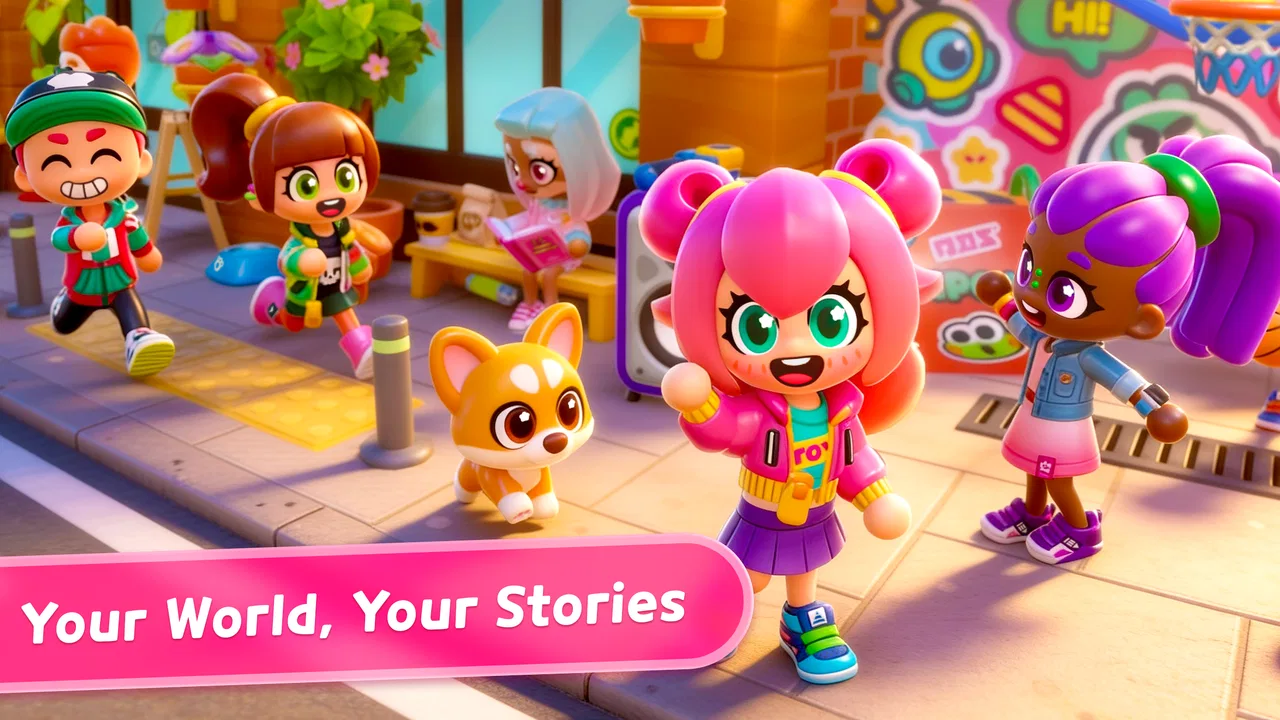
Stories Life: Kids World Game
- 4.7
- Rating
- 100.00K
- Installs
- Free
- Price

 Analysis by App-foxy
Stories Life: Kids World Game is the kind of educational game I would look at when a child wants a creative play space rather than another level-based challenge. I spent time treating it as a small shared world: making characters, arranging a home, moving around the city, and turning ordinary objects and places into short roleplay scenes. That approach is important because the game’s appeal is less about winning and more about deciding what happens next.
Developed by SUBARA, it is free to download and aimed at Everyone. The basic idea is easy to understand: children can build a life around avatars, homes, city locations, and mini stories. I found that open-ended format inviting, especially for children who enjoy pretend play but do not always want to draw, write, or follow a fixed story. At the same time, the freedom can feel less satisfying for a child who expects missions, clear goals, or a strong sense of progression.
Its store short description is “Stories Life,” while the fuller summary explains the world-building focus. In practice, I would describe it as a kids’ avatar roleplay game with an educational angle, not as a traditional lesson app. The learning comes through choices, sequencing, imagination, and social storytelling rather than quizzes or visible schoolwork.
You May Also Like

 Blood Strike: 2.5 Anniversary
Blood Strike’s Loadouts Turn Every Drop Into a Tactical Gamble
A close look at Blood Strike’s custom loadouts: how fast access to signature weapons reshapes its battle royale rhythm, rewards preparation, and narrows the gap between fights.

 Pandora - Music & Podcasts
Pandora’s Music Is Easy to Start, but Harder to Recover
Pandora’s strength is its low-effort path from a seed to a station. Its weak spot is how much confidence it asks you to place in connection, setup, and quiet recovery.

 8 Ball Pool
 Is Built on Rivalries, Rematches, and Routine
A close look at the rivalries, rematches, shared routines, and unanswered safety questions that turn a quick pool match into a persistent mobile community.

 Samsung Music
’s Quiet Strength Is Playing What You Already Own
Its reach comes less from spectacle than from dependable access to a personal library. That simplicity is both the app’s strongest retention engine and its ceiling.

 AccuWeather: Weather Radar
AccuWeather Review: A Quick, Clear Forecast for Everyday Decisions
For everyday plans, the best forecast is the one you can understand quickly. AccuWeather makes rain timing, radar, and local conditions easy to act on, with a few trade-offs.

 Hill Climb Racing
Why Hill Climb Racing Still Turns Crashes Into One More Run
A tiny car, a bumpy hill and one more upgrade: Hill Climb Racing keeps resurfacing because its simple chaos makes every near-miss feel personal.
More From Our News Desk
View All News


How it works on a shared family device
The most realistic way to use this game is in short, shared sessions. Imagine a child waiting while dinner is prepared, then handing the phone to a sibling after creating a scene in the living room. One child may arrange the home and choose who lives there, while another takes the same idea into the city and invents what happens outside. That makes the game suitable for casual household play, but it also creates a practical issue: the device becomes the boundary between different play sessions.
I recommend agreeing on a simple routine before handing it over. Decide whether children are creating one continuing world or separate stories during each turn. Without that small conversation, a younger child may change a scene that an older sibling carefully arranged, and the resulting frustration has nothing to do with the game’s creative tools. The title encourages shared imagination, but the household still needs its own rules for whose turn it is and what may be changed.
There is a useful creative benefit to this arrangement. A parent can ask a child to explain the story they made instead of simply watching the screen. “Who lives here?” “Why did this character go to the city?” and “What happens next?” turn a quiet play session into a conversation about sequence, motives, and consequences. I found that this is where the educational value feels most natural: the game gives children something concrete to talk about.
For a shared device, I would also keep expectations modest. This is not the sort of app I would install as a replacement for a structured learning platform. It works better as a creative break that can support language and imagination. If the child needs spelling practice, arithmetic exercises, or a curriculum-linked activity, a dedicated educational app will usually be the more direct choice.
Creating a world without losing the story
Open-ended roleplay can become scattered very quickly. A child may place characters in several locations, change the home repeatedly, and move on before any story develops. I got better results by starting with one small premise: a character is preparing the home for a visitor, a family is exploring the city, or two avatars need to solve a simple everyday problem. The premise gives the creative tools a purpose without turning play into an assignment.
A particularly effective workflow is to build in stages. First, create or arrange the main home. Next, decide which characters belong in the scene. Only then move into the city for the next part of the story. This order helps children understand that a story can have a setting, characters, and events. It also prevents the common problem of spending all the available time decorating and never reaching the roleplay itself.
I would encourage children to pause between scenes and retell what happened. They can describe the beginning, the change, and the ending aloud, or make a new scene that shows the next moment. That turns free play into a simple storytelling exercise without pretending the game offers a formal writing tool. It is one of the stronger ways to get more value from the app than a quick round of random avatar movement.
Another useful tip is to keep the number of characters manageable. A crowded scene may look exciting, but younger players can lose track of who is doing what. Starting with two or three important characters makes it easier to give each one a role. Once the child understands the flow of a story, adding more avatars becomes a creative choice rather than visual clutter.
What parents should settle before play begins
The game is free, but it includes in-app purchases ranging from $2.99 to $11.99 per item. That makes a quick conversation about purchasing worthwhile before a child plays independently. I would be especially careful on a shared phone or tablet, where a child may assume that tapping a purchase option is part of customizing the world. The safest household approach is to decide in advance whether purchases are off-limits, reserved for an adult, or discussed one at a time.
It is also worth separating the idea of “free to start” from “everything is available without spending.” Children may see an item or option they want and feel that the game is asking them to finish their world by buying it. I would explain that the creative activity can continue without treating every visible option as necessary. This is a small but important lesson in digital spending, particularly for younger users.
Account boundaries deserve the same attention. I would not assume that a shared device means every child should use the same ongoing world. If several children play on one device, decide whether the household will keep one communal setting or use clear turn-taking rules. If the child is using an adult’s phone, I would also avoid leaving the game open while another person needs the device for messages, work, or banking. The game itself may be simple, but shared hardware always benefits from clear boundaries.
For younger children, I prefer an adult to be nearby during the first session. That is not because the premise is complicated; it is because open-ended games often produce questions about what can be changed, what belongs to which story, and whether a purchase is allowed. A short introduction can prevent confusion and help the child learn the world’s rhythm faster than leaving them to tap through everything alone.
Coordinating play between siblings and adults
Stories Life works best in a household when people coordinate the creative process instead of competing over the device. One child can be the “director” who explains the scene, while another arranges the home or moves the avatars. Then they can switch roles. This gives both children ownership and makes the game feel cooperative even when only one person is physically holding the phone.
Adults can use the same method without taking control away. Rather than rebuilding the scene themselves, I would ask the child to choose the location and explain the reason. If a parent changes everything to make it look more organized, the child may learn that the world belongs to the adult. Asking questions keeps the child in charge while still encouraging planning and communication.
A practical way to avoid arguments is to finish each session with a stopping point. Save the story mentally by describing its current situation: the characters are at home, the visitor has arrived, or the city trip is about to begin. Even if the game does not provide a formal chapter system, a spoken “next time” gives children a clear reason to stop. It is much easier than ending in the middle of random tapping and then trying to remember what the original idea was.
For a family with limited screen time, I would use a story goal rather than a timer alone. A child might have ten minutes to prepare a scene and then explain it, or two siblings might complete one beginning-to-ending story before putting the device away. This keeps the session purposeful without claiming that the game has built-in scheduling tools. The household supplies the structure, while the app supplies the setting.
There is also a trade-off between shared creativity and personal ownership. A communal world can encourage conversation, but it may frustrate a child who wants to control every detail. Separate sessions are better for careful decorating and private pretend play; collaborative sessions are better for dialogue and improvisation. I would choose between them based on the children’s temperaments rather than forcing one format on everyone.
Age context, trust, and supervision
The Everyone rating makes the game approachable for a broad audience, but an age label is not a substitute for knowing a particular child. Some children will immediately understand the pretend-play format, while others may need help turning a collection of avatars and places into a coherent activity. I would judge readiness by attention span, ability to follow household purchase rules, and comfort with open-ended play.
For preschool-age users, an adult may need to model the first story. Keep it simple: choose a home, introduce two characters, and give them one reason to move somewhere else. The child can then take over. Older children may prefer to create more elaborate situations, but they can also become more invested in keeping their arrangements unchanged. That is another reason to establish whether siblings may edit one another’s scenes.
Trust should be built around the device as well as the content. I would show a child which parts are for playing and which actions require an adult’s permission. I would also make it clear that a free game can still present optional purchases. This is not an accusation or a warning that the child will do something wrong; it is ordinary digital literacy, and the game provides a useful situation for practicing it.
Parents looking for a quiet, fully structured experience may find the open format less predictable than expected. There may be moments when the child simply rearranges things without developing a story, and that is not necessarily a problem if the goal is relaxed imaginative play. It becomes a mismatch when the adult expects measurable lessons or a fixed daily curriculum. In that case, a conventional educational game with explicit exercises will be more suitable.
I would also skip it for children who dislike making their own goals. Some players want clear rewards, levels, puzzles, or instructions telling them what to do next. This game’s strength is that it leaves room for invention, but that same freedom can feel empty to a child who needs constant direction. Watching a short first session is enough to tell which response you are likely to get.
Performance expectations and everyday friction
The current version is 1.04, and the minimum operating system is Android 7.1. Those details make it relevant to households that keep an older Android device for children, although compatibility alone does not guarantee that every older phone will feel equally comfortable. A larger screen is generally more practical for arranging a home and moving around a city than a small phone, especially when two people are looking at the same scene together.
On a phone, the shared-device experience can become physically awkward. A child may want to hold the device close while a sibling tries to watch or give directions. A tablet is better for discussion, but it may also become the household’s main entertainment screen, which makes turn-taking even more important. I would choose the device based on how often the game will be played together, not only on whether it installs.
The game’s free entry is helpful for testing that fit. I would let the child try a short session before considering any optional purchase. Pay attention to whether they create stories, explore the city with a purpose, or simply tap through locations. If the child is engaged by the roleplay itself, the app has a good chance of earning a regular place in the household. If they lose interest without external rewards, spending more will not solve the underlying mismatch.
One limitation of this kind of play is that its quality depends heavily on the player. The same set of creative possibilities can produce a thoughtful story or a disorganized sequence of actions. I see that as a fair trade-off rather than a flaw, but parents should know what they are choosing. The game offers a stage; it does not replace the child’s imagination, and it does not automatically turn every session into learning.
How it compares with familiar alternatives
Compared with quiz-based educational games, this one is gentler and less measurable. A quiz app can make it obvious what a child practiced and whether they improved. Stories Life is better for expressive play, sequencing, and conversation, but those benefits are usually visible through the child’s behavior rather than a score. I would use the two types for different purposes rather than expecting one to replace the other.
Compared with construction-focused sandbox games, the avatar-and-life format gives pretend situations a more central role. A building sandbox may be better for children who want to design large structures or experiment with materials. This game is the better fit when the child wants characters to inhabit a home, visit a city, and act out small events. The distinction matters because “creative” can mean very different things to different children.
Compared with storybooks or children’s television, the game gives the child more control over the order and outcome of events. That can encourage active participation, but it also means the experience is less polished and less predictable than a finished story. I would choose a book when the household wants calm shared reading and a complete narrative; I would choose this app when the child wants to be the person deciding what happens.
Compared with competitive games, it is a more natural fit for siblings who can cooperate. There is no need to establish a winner for the roleplay to work. Still, cooperation is not automatic. Children may compete over who controls the device or whose story becomes the official one. The app supports a cooperative atmosphere best when adults provide the turn-taking structure.
Who will get the most from it
I think the strongest audience is children who already invent pretend scenarios with toys, dolls, figures, or drawings. The digital world gives those habits a home and a city to move through, while the avatar format makes it easy to switch between roles. It is also a good option for a parent who wants a screen activity that can lead into conversation rather than ending with a score.
It can be useful for language development in an informal way. Ask the child to describe where a character is, what they need, and what changed between two scenes. These prompts encourage vocabulary and sequence without presenting the game as a language course. For children who are shy about writing, speaking through a character may feel easier than answering direct questions.
It is less attractive for children who need firm objectives, fast action, or visible achievement. It is also not my first choice for a parent seeking detailed progress reports, lesson plans, or a tightly controlled educational path. The educational category describes the kind of value the game can support, but the experience remains primarily roleplay and creative exploration.
The rating of 4.6 from around 1,200 ratings and more than 50,000 installs suggest that the concept has found an audience, but I would not use popularity as a substitute for fit. The important question is whether the child enjoys building a situation and staying with it. A well-liked open world can still be the wrong choice for a child who wants instructions, while a quieter child may find exactly the freedom they need here.
My household verdict
After using it as a shared creative space, I see Stories Life as a pleasant choice for families that can provide light structure. Its best moments come when a child builds a small world, gives the characters a reason to move, and explains the story to someone else. The home and city settings make that process approachable, while the mini-story format keeps the activity closer to pretend play than to formal study.
I would start with the free version, use one device rule, and postpone any purchase until the child has shown sustained interest. I would also decide whether siblings share one world or take separate turns before the first session. Those simple steps address the main household friction: ownership, stopping, and spending.
My recommendation is positive, with one clear condition: choose it for imaginative roleplay, not for traditional lessons. For a child who likes avatars, homes, city adventures, and making up everyday stories, it can become a thoughtful screen activity. For a child who needs levels, puzzles, or direct academic practice, another educational game will probably serve them better.
As a free game for Everyone, it is easy to try without committing the household to a particular learning system. Just keep the experience grounded in conversation and agreed device boundaries. Used that way, Stories Life: Kids World Game is not merely something to tap through; it becomes a small shared stage where children can practice planning, expression, and cooperation while deciding what their world looks like.
FAQs for Stories Life: Kids World Game
01What is Stories Life: Kids World Game?
Stories Life: Kids World Game is an interactive children’s game focused on creative play, exploration, and everyday storytelling. Players can explore different locations, interact with characters and objects, and create their own scenarios instead of following a strict linear adventure. Its open-ended format is designed to encourage imagination, role-play, and simple problem-solving in a colorful, child-friendly environment.
02Is Stories Life: Kids World Game suitable for children?
The game is generally aimed at young children and families, with accessible controls, bright visuals, and activities that are easy to understand. However, suitability can vary depending on the child’s age, reading ability, and comfort with mobile games. Parents should review the store listing, age rating, available content, and privacy information before allowing independent play, especially for younger children.
03Does Stories Life: Kids World Game require an internet connection?
Some parts of Stories Life: Kids World Game may work without a continuous internet connection, but this can depend on the device, installed content, updates, and optional features. An internet connection may be needed for the initial download, updates, advertisements, cloud services, or additional purchases. It is best to launch the game once while connected and check which features remain available offline.
04Are there advertisements or in-app purchases in the game?
Parents should check the current Google Play or App Store listing because monetization options can change between versions and regions. Games for children may include optional purchases, advertisements, locked locations, character items, or extra content. Before handing over the device, review the purchase settings, enable parental controls, and use password or biometric confirmation to help prevent accidental transactions.
05What should parents know about privacy and device permissions?
Before downloading Stories Life: Kids World Game, parents should read the developer’s privacy policy and examine the permissions requested by the app. Pay attention to whether it collects usage data, device identifiers, account information, or information related to children. Avoid granting permissions that are not necessary for gameplay, and use the platform’s family settings to manage access, purchases, and online interactions.
Pros
- Simple controls make it easy for young children to explore independently.
- Offline play is useful for travel or areas with limited internet access.
- Gentle storytelling provides a calm alternative to fast-paced games.
- Bright visuals and sound effects help keep children engaged.
- Short activities suit brief play sessions and limited attention spans.
Cons
- Some content or features may require in-app purchases to unlock.
- The game may become repetitive after children complete familiar stories.
- Limited challenge can reduce its appeal for older children.
- Sound effects may feel distracting in quiet environments.
- Parents should review privacy and advertising settings before use.

Stories Life: Kids World Game
Gallery